Last updated: October 12, 2026
Key Takeaways
- Pick the setup by source, reviewer, and formatting needs.
- Authenticate, create a draft, then publish or schedule it later.
- Use Application Passwords for a single site; use OAuth for delegated access across users or environments.
- Map title, content, media, taxonomy, and publish time before the first request.
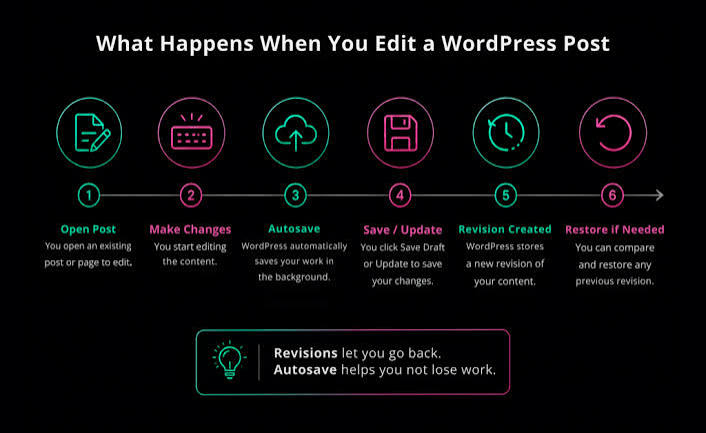
Quick Answer: to auto publish article drafts to WordPress via REST API, use a draft-first workflow and expect one request to create the article, then a second request to publish it. WordPress added Application Passwords in 5.6 in 2020, which makes this easier on a single site. With structured content already in hand, it is usually a two-step job, not a one-click push.
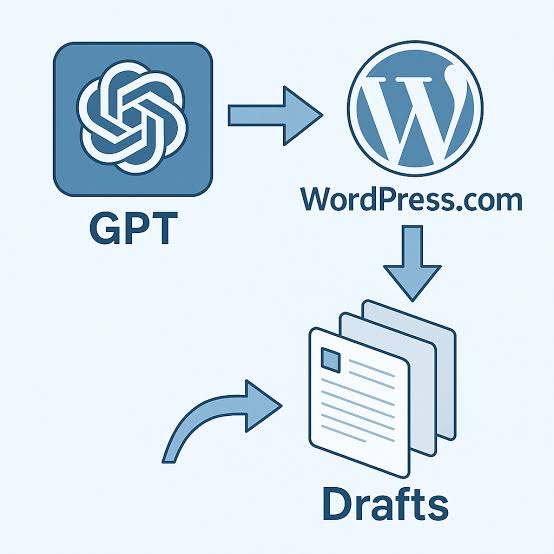
Need the drafts to land in WordPress without copy-paste? The REST API is the clean route for how to auto publish article drafts to WordPress via REST API: it lets you create articles, set them as draft or pending, and move them through review from another app, script, or CMS. Strong fit? Yes, when your article data is already structured and the publishing flow repeats. Poor fit? Also yes, if you only need a one-off upload once a month.
What actually determines the right setup?
Three things decide it: where the draft starts, who reviews it, and how much formatting you need to keep intact. Plain text or Markdown from a small source usually works with a WordPress Application Password. But if the material comes from a headless CMS or content pipeline, you may need OAuth, custom fields, image uploads, and scheduled publishing.
The WordPress REST API can create articles through POST /wp-json/wp/v2/posts. The real question is which object should exist first: a draft, a pending article, or a scheduled one? For most editorial teams, draft is the safest default because humans stay in the loop. Skip that, and a bad headline, slug, category, or featured image can go live in a blink.
One article can be created as a draft and reviewed later the same day. Another can be queued for 9:00 AM on a specific date. Same endpoint. Different outcome. That difference matters.
Here is the simplest way I would think about it:
| Situation | Best Path | Why Other Options Fail |
|---|---|---|
| One writer, low volume, manual review | Application Password + draft articles | OAuth is extra work you do not need |
| Multi-author team with editors | Draft or pending status + reviewer workflow | Auto-publish skips editorial control |
| Content coming from another CMS | API integration with mappings for tags, categories, custom fields | Copy-paste breaks scale and consistency |
| Images and embeds are critical | Upload media first, then reference media IDs in the article body | Plain HTML only often leaves broken media |
| Strict automation on a schedule | Create draft, then update status later | Publishing immediately removes a safety check |
Starting from scratch? I would create the draft first, then add review and scheduling later. It is slower by a day or two, sure, but it keeps accidental live articles off the site. Quick check: if human error is the bigger risk, start with drafts; if process drag is the bigger problem, move to scheduling after review.
How do I auto publish article drafts to WordPress via REST API?
Authenticate, create an article with status: "draft", then update or publish it when the content is ready. The core move is a JSON POST call to the posts endpoint, and the lightest auth method is usually a WordPress Application Password, which WordPress added in 5.6 in 2020. That beats building a full OAuth flow for a single site by a mile.
Here is the working shape of the process:
- Make sure the site is on WordPress 5.6 or newer so Application Passwords are available.
- Create a dedicated user for automation, usually with an Editor role if it needs to create drafts.
- Generate an Application Password for that user in the profile screen.
- Send a `POST` request to `/wp-json/wp/v2/posts` with title, content, and `status: “draft”` or `status: “pending”`.
- Attach categories, tags, slug, excerpt, and featured media ID in the same request if you already have them.
- After review, send a `POST` or `PUT` request to the same article ID with `status: “publish”` or a future `date` for scheduling.
A minimal JSON payload looks like this:
json

{

  "title": "My Article Title",

  "content": "<p>Body text here.</p>",

  "status": "draft"

}
Want it live right away? Change status to publish. Need editorial review? Keep it as draft or pending. I would use pending when an editor must approve every article, because the queue stays obvious.
One practical wrinkle: the API will not repair bad HTML for you. If your source emits malformed tags, odd shortcode syntax, or broken embeds, the draft will still be created, but someone will clean it up later. Many teams convert Markdown to HTML before sending it for exactly that reason. Quick check: if your content already lives in a structured system, the REST API is the cleanest bridge; if it lives in a free-form doc, you need a conversion step first.
Which authentication method should I use?
For one site, a trusted script, and simple automation, use Application Passwords; save OAuth for a third-party app that needs delegated access across users or environments. For most publishing pipelines, Application Passwords are the shorter route because they are built into core WordPress and do not require a plugin.
Running a local script, a CI job, or a server-side app that talks to one site? Application Passwords usually win. They are easy to revoke, and they keep credentials tied to a specific user account. But if the automation must act on behalf of many users, or you are building a public SaaS integration, OAuth makes more sense because token-based delegation beats a shared login secret.
Here is the trade-off I would not ignore: Application Passwords are convenient, but they are only as safe as the account they belong to. Put them on an Administrator account, and the blast radius grows fast. I would create a dedicated user with the lowest role that still can create the content you want. For many editorial setups, that is Editor; for tighter workflows, a custom role may be better.
People often get stuck because they try to authenticate from the browser with JavaScript. That exposes credentials in the client, which is a bad idea. Keep the API call server-side whenever possible. Need browser access anyway? Put a backend in front of it.
Quick check: one server owns the publishing job, so use Application Passwords; users must authorize your app individually, so plan for OAuth.
How do I make drafts publish with the right fields?
Map every field you care about before the first POST: title, content, excerpt, slug, categories, tags, author, featured media, and publish time. Send only title and content, and WordPress will create the draft, but you will still be fixing taxonomy and media by hand.
A reliable flow looks like this:
- Prepare the article as HTML, not raw Markdown, unless your pipeline converts Markdown before upload.
- Check that your slug is clean and shorter than the title, because WordPress may auto-generate one if you skip it.
- Resolve category and tag IDs ahead of time by querying `/wp-json/wp/v2/categories` and `/wp-json/wp/v2/tags`.
- Upload the featured image to `/wp-json/wp/v2/media` and save the returned media ID.
- Send the post creation request with `featured_media`, `categories`, `tags`, `excerpt`, and `status`.
- Verify the response JSON, especially the article ID and generated permalink, before moving to publish.
This is where a lot of generic guides get slippery. They tell you to “send the content,” but content alone is not enough if your editorial standard depends on a featured image, a specific author, or a scheduled date. The REST API also wants IDs for categories and tags, not names, so your script needs a lookup step. That part matters more than most people expect.
Here is a concrete example of a scheduled article payload:
json

{

  "title": "Launching the New Workflow",

  "content": "<p>Ready for review.</p>",

  "status": "future",

  "date": "2026-10-20T09:00:00"

}
That future status is useful if your content is approved but should not appear until a specific time. It is not the same as a draft. I would use future only after your review process is stable, because it removes one human checkpoint. Quick check: if your articles need categories, tags, and a hero image, map those before automation starts; if they do not, keep the payload small.
When the standard advice is wrong
The standard advice falls apart when your content is not just text, when your review team is strict, or when plugins change how articles are stored. If your setup is simple, the default REST route is enough. If it is not, a “just POST JSON” answer will waste your time.
Here are the cases that break the normal pattern:
- Situation: Gutenberg blocks are required. What changes: plain HTML may not preserve block structure. What to do instead: send block markup carefully or generate content in the block format your editor expects.
- Situation: Advanced Custom Fields or custom post meta drives the page. What changes: those fields may not be writable by default. What to do instead: expose the fields through the REST API or use a plugin that registers them properly.
- Situation: The site has multilingual content. What changes: one article may need linked translations. What to do instead: integrate with the multilingual plugin’s API or translation metadata, not just the core posts endpoint.
- Situation: The draft includes large images or video embeds. What changes: media upload and storage become the bottleneck. What to do instead: upload media first, then insert IDs or hosted URLs into the article body.
- Situation: Security rules forbid long-lived credentials. What changes: Application Passwords may be too blunt. What to do instead: use a short-lived token flow through your backend and rotate credentials on a schedule.
The hidden trap is plugin behavior. Some SEO, custom field, or editorial plugins add required meta fields or rewrite content after save. So the draft may look fine in the API response and still render oddly in the admin. If the site depends on plugin-driven fields, test against that exact stack, not a plain install.
Bulk import is another edge case. Push 500 drafts in one run, and rate limits plus server timeouts become the real headache, even if the API itself is fine. I would chunk the job into batches of 20 to 50 and log failures per article so one bad record does not stop the whole run. Quick check: if your site uses Gutenberg, custom fields, or multilingual plugins, assume the plain posts endpoint is only half the job.
What should I automate first if I want fewer mistakes?
Automate the boring checks first: credential validation, slug cleaning, media upload, and a draft-only test run. Jump straight to auto-publishing, and the first broken image or malformed title goes live before anyone can catch it.
My order would be:
- Start with one article and create it as a draft only.
- Inspect the response for the article ID, status, and generated URL.
- Verify the draft in the admin, especially formatting, author assignment, and featured media.
- Add categories and tags once the basic create flow is stable.
- Add scheduling or publish-after-review logic only after the draft path is clean.
- Save logs for each API response so errors are traceable later.
This staged approach is slower than a full automation sprint, but it is the one I would trust. Why? Because publishing workflows fail at the seams, not in the happy path. A draft-only run exposes slug conflicts, permission issues, and content encoding problems without putting bad copy in front of readers.
I would also keep an eye on file size and content length. Large articles with many embedded images are more likely to fail in transport or to become unwieldy in the editor. There is no magic threshold here, but once an article becomes image-heavy and metadata-heavy, your script needs retries and better error handling, not just a bigger payload.
Quick check: if your current process depends on copy-paste, begin by automating only draft creation; if that succeeds cleanly, expand one field at a time.
Can I publish directly instead of creating drafts?
Yes, but I would only do that when the content source is already trusted, reviewed, and mechanically correct. If the article comes from a content team, a CMS, or a human approval flow, draft first is safer. If the article comes from a locked-down pipeline with no manual edits, direct publish can save a step.
The direct-publish path is simple: send the same payload as draft creation, but use status: "publish". Need a timed release? Use status: "future" with a future date. That sounds easy, and it is, until something subtle is wrong. A missing category is not fatal; a wrong claim, broken HTML tag, or bad featured image is.
Here is my rule: if the cost of a bad article is low, direct publish is acceptable. If the cost includes customer confusion, legal review, or a brand correction, do not auto-publish without a review stop. That is especially true for regulated industries and for teams that rely on precise metadata.
This is the trade-off against the obvious alternative. Drafts add friction, but they also add one last human check. Direct publish removes that check, which only makes sense when the upstream system is already trustworthy.
Drafted with AI; not yet reviewed by a person.